We’ve Moved!
Wednesday, July 25th, 2012Come check out our new blog The Orange Sofa for tons of great articles and tips on social media marketing! See you there!
Come check out our new blog The Orange Sofa for tons of great articles and tips on social media marketing! See you there!
Boulder has a thriving tech scene, which is one of the many reasons Votigo opened a Boulder office - that,
and the abundance of outdoor activities. Boulder’s tech scene is booming and Startup week is one of many opportunities to engage with some amazing entrepreneurs and thinkers that call Boulder home.
All week long there are events from coffee shop meetups to after hours get togethers, all aimed at helping startups be successful. Topics range from how to get funded, to how to market your brand and everything in between.
Votigo is always looking for ways to help brands be more successful with social, so we hosted a panel on Social Marketing for Startups. Panelists included some of Boulder’s most impressive startups: Anna Sawyer from Trada, Justin Segall from Simple Energy, Alex White from Next Big Sound and Chuck Lepley from Orbotix. Scrib, a co-working space in Downtown Boulder was kind enough to host the event at their location.
The panelists provided the packed house with insights about the challenges startups face with social as well as best practices and ideas for making the most of a lean marketing budget. It was an informative panel and a great chance to mingle with some like-minded tech people.
Make sure to check out the rest of the events this week for Boulder Startup Week. It’s great to be in Boulder.
Last December, the Votigo blog featured a post that outlined helpful methods for promoting your promotion across social networks. Now that Facebook is Timeline-optimized, we want to update our strategies for successfully promoting your Votigo-powered promotion and share best practices for customizing your promotional app to draw your audience in. We are often asked by our clients about how to promote Facebook contests and sweepstakes in an effective and methodical way. The answer is complex in that it includes a series of essential steps that you should follow in order to fully engage your audience.
Before You Publish a Promotion
There are essential questions that you should ask before you publish a promotion. Should you publish to multiple access points? Do your custom graphics have an engaging image that has a call-to-action? How do you customize the sharing messages – Facebook and Twitter – when building it?

Publishing to multiple entry points is optional, but wise if you have a mobile audience or want to embed an iframe version of your promotion into a website outside of Facebook (such as your homepage or blog). Utilizing the mobile capability is a must if your audience reviews your mobile site or reads your emails on their mobile devices. By providing multiple entry points for customers, you will remove barriers to entry.
Also, your promotional graphics must have clear calls-to-action to eliminate confusion for people entering your contest or sweeps, especially when it comes to adding a custom like-gate image. It isn’t enough to upload a beautiful graphic if there is no call-to-action to accompany it, such as, “Like our page to enter the promotion,” or “Enter the sweepstakes below.” Your graphics tell a visual story, as well as provide direction to your audience.
Customizing the sharing messages on Facebook and Twitter when you are building your promotion is a very important feature. This is the message that you will be providing your fans to share to their audiences. Make it unique, engaging and simple. They of course may edit it before sharing.
After You Publish a Promotion: Customize your App icon
Now, optimize your Facebook Timeline to draw attention to it.
These steps will allow your audience to easily locate your contest or sweeps on your Timeline - just below your cover photo - and draw them in visually with a unique and attractive image. This is a very important piece of the promotion puzzle that gets overlooked in many cases. But it’s critical in Timeline, where only four Apps show at a time, and all visitors to your Facebook page see your Timeline page first.
To customize the app icon graphic image and rename the app icon:
Position your App Icon
Then make sure your promotion is in the top 4 apps on your timeline. You can adjust this by manually by choosing the dropdown arrow next to the top 4 apps and selecting the pencil icon in the top right corner of the app icon. You can then choose to swap positions with one of the apps in the top 4.
Promote on your Timeline
Write a post about your promotion with a graphic (400×400) and pin it to the top of your Timeline 7 days! You can do so by clicking the “Pencil” icon (upper right) to “Pin” your posting on your Timeline.
Make sure you write a compelling message about the promotion – the theme, the prize, and other details to compel readers to enter.
Tell People About It Beyond Facebook
Now that you have customized your app icon and pinned a posting of it on your Timeline, you are ready to start promoting cross-channel. This is essential to kickstart the viral effect and to draw in the critical early adopters.
Fortunately there are plenty of tools to spread the word. Do these things to activate your social audience:
1) Post messages and updates about it on your Facebook page (and make sure your team “Likes” it too)
2) Tweet about it regularly – some brands do so daily
3) Post about it on your company’s LinkedIn profile page, and on the status updates of your individual employees
4) Write a blog post about it on your corporate blog
5) Send promotion announcement in your email marketing messages, newsletters and even day-to-day emails.

6) Create a video about it and post it on YouTube
7) Set up a display advertising campaign on Facebook
8 ) Tell influential bloggers and Tweeters about it
9) Tell your clients about it directly; word-of-mouth is powerful
10) Post about on Google+ (and make sure to “+1″ it from your own account)
11) Use in-store signage if you have retail locations
12) Broadcast a consistent message about it in your traditional media (radio, TV, print) advertising
13) Put out a press release about it
14) Point PPC ads from AdWords directly to the promotion app
15) Contact industry associations to message their members about it
Also, a few quick essential reminders for promoting any social contest, sweepstakes, competition or other promotion:
It’s a simple blend of old and new tactics for spreading the word, but you might be surprised by how many brands fail to lay the groundwork of their promotion from the beginning. And you can always contact us for help.
If you enlist the right combination of the tactics above for your audience, you can expect the viral effect to kick in and generate awareness and participation. You’ll increase your “Likes” and expand your social media audience, get permission to email a whole new list of potential customers, and inspire great content that you can use for future marketing efforts.
What strategies have been most effective in promoting your latest campaigns? Tweet us @Votigo or post about it on our Facebook wall.
Yesterday Facebook announced the Preferred Marketing Developer (PMD) program, merging the Preferred Developer Consultant (PDC) and Marketing API programs. PMD is a huge indicator of the commitment Facebook is making to developers and platforms like Votigo. And it’s an important signal to brands and businesses about the most important components of marketing on Facebook.
Facebook has fostered an ecosystem of developers almost as long as it has allowed brands to create Pages. We’re thrilled to see the evolution of the ecosystem. It’s the latest in a series of momentous changes this year that renew Facebook as the hub of social marketing. And it shows that Facebook is doubling down on the model of companies like Votigo partnering with businesses and brands like yours to innovate, introduce new technology, and help you reach your marketing goals within the Facebook brand experience.
We are truly cross-platform, the leading technology provider of marketing and promotions on YouTube, Twitter, Instagram, mobile and all other social channels. Yet we are as committed as ever to growing and innovating with our customers on Facebook. There is still so much opportunity, and our customers are investing in social marketing as a strategic, always-on software service that bolsters their entire marketing plan.
Votigo powered our first promotion on Facebook in August, 2008. We became one of the early PDCs in March, 2010. Apps, and especially promotions apps like UGC contests and sweepstakes, have always been our focus, and the centerpiece of marketing activity on Facebook. To this day, nothing beats a photo contest for inspiring user-generated content and viral sharing among followers. Their impact has only expanded since the Timeline layout rolled out last month (Timeline makes apps more visually engaging, inside and out.)
We are proud to sport the PMD badge for Apps. We’re excited to keep collaborating with world-class brands and agencies, and small business and start-ups alike, on Apps and beyond. Contact us to learn about our full-service capabilities or create a Votigo account to begin building promotions and marketing apps on your own.
The tools for engaging your audience on Facebook have never brought you closer to the consumer than they do now. Let’s get started.
Ready or not, your company’s Facebook page transitioned to the Timeline layout a week ago. (For more information about this change, which Facebook announced in February and finalized on March 30, please check out our last several posts.) Yet the change is new enough that we’ve noticed plenty of brands and businesses haven’t taken all the steps to optimize their Timeline, or draw their Facebook audience to it.
If you haven’t really made the transition yet, your Timeline may have a blank space at the top, and crickets chirping in the background. Here are four things you can do immediately:
1) Make it Visual
Above all, Facebook made the change to Timeline to create “a big, fat, storytelling canvas” for your business (their words, not ours.) Fittingly, the most noticeable changes are opportunities to tell the visual story of your brand. The centerpiece: an expansive (851×315 px) new Cover Photo atop your page. Brands from Verizon to the local candy shop are using this valuable real estate to showcase user-generated content, take visitors inside a store, highlight employees and team members, introduce new products, or convey an aspirational moment (like luxury travel). You can’t use a call-to-action in this space- but you can do nearly anything else to introduce your brand. If you haven’t uploaded an image, this space is blank. Choose a picture and do it.
And don’t stop there. Other opportunities to make your Timeline more visual are to
• Post a large Profile Picture (180×180 px) and Custom Apps/Tabs Icons (111×74 px) right below the cover photo
• Pin large photos and posts to the top of your Timeline where they will remain for 7 days
• Create Milestones that tell a chronological narrative of your company
• Highlight posts, giving them twice the width on your Timeline – a great way to showcase Milestones
For more details on each of these new features, check out Facebook’s Pages Product Guide.
2) Engage them directly
In addition to being a visual canvas, Timeline is also supposed to serve as “Mission Control for your business” (quoting Facebook again). The fundamental activity for brands on Facebook has always been dialogue directly with your fans and customers. Timeline makes this even easier by making the brand experience on Facebook more similar to the person-to-person experience.
Take advantage of the reset opportunity that Timeline offers by doubling down on dialogue with your fans. The new Message feature is one of the best Mission Control features available. Encourage users to message you directly (in the upper right corner of Timeline.) Then log-in to your admin panel- complete with improve metrics and Insights, and answer those direct messages. Get feedback, provide service, and cultivate long-term customers. Mission control!
3) Engage them, Part II
With the initial setup and dialogue work in progress on your Facebook Timeline, the fun begins. The biggest challenge for brands on Facebook is how to engage your fans so that they visit your page, or at least read your posts when they become visible on their Newsfeeds.
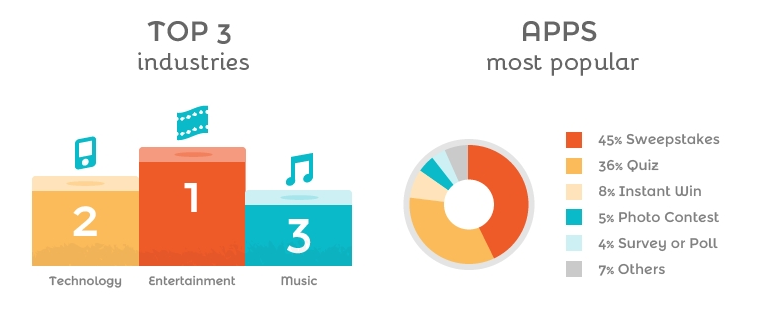
Promotions and other apps are effective ways to engage your audience, and get them to not only revisit you on Facebook but also spread the word. Run a sweepstakes to draw more fans to your page and generate some buzz. Or run a viral photo or video contest to inspire user generated content and word-of-mouth, in the form of users directing friends to your Facebook page to vote for their entry.
Both are tremendous ways to introduce a new product, promote an event, reinforce your brand, or simply check-in with your audience.
4) Plug it back in
How do you convert fans on Facebook- or followers on any social channel- into happy, long-term customers? (That is ultimately the goal with most marketing efforts!) By plugging it back into your greater marketing strategy. Social conversations and promotions are no different. Here are some basics to remember:
Go across channel: Make sure to optimize all marketing – including social – for your audience, and for emerging formats. Twitter is fantastic for short-form, frequent check-ins. LinkedIn lends itself to a B2B and service-oriented audience. Pinterest is for all things visual Social marketing should be branded consistently to your email marketing, digital (display) advertising, and even traditional campaigns (TV, print and trade shows).
Use the content: if you collect glowing reviews of your company or products when talking to users, or photos or videos from a contest app, use them! On your website, in your adds, in brochures, in future emails. Customer-generated content is the most powerful form of referral.
Expand your marketing database: Anytime you collect email addresses- by interacting with an individual or running a sweepstakes, for example- don’t forget to add them to your email marketing database (assuming the users have “opted-in,” of course). Email marketing is a powerful compliment to social, and vice versa, so don’t forget this important step.
5) Activate
Promotions are about activating long-term customers from within your audience. So whatever your goals may be, whatever channels and themes and promotions you decide on, make sure you provide an opportunity for people to become customers. Whether that means offering all sweepstakes entrants a coupon or discount code, mailing gift cards to contest finalists, giving free trials or new products away to power users, or driving store traffic to retail locations or ecommerce pages, make sure that you offer an activation step.
Timeline is here. Take advantage of the new layout and the opportunities it offers. And like all marketing efforts, follow through to make the most of your Facebook strategy.
Facebook finalizes the transition to Timeline for brands one week from today (March 30), presenting a timely opportunity ito make your Facebook page the visual, storytelling hub of your brand. In case you missed the news, here are a collection of useful resources on Timeline, :

Many brands have already crossed over to the Timeline. Favorites to date are using the new page layout to deliver a specific and targeted brand message. Some use aspirational imagery to take Facebook users somewhere special (Starwood Preferred Guest, Pier 39, Kurumba Maldives). Some are mission-driven (TOMS Shoes, American Heart Association). Some use the larger tab/app icons to drive viewers to other social channels like YouTube (Sphero). Some illustrate their brand with adorable baby photography (Kristin Richardson Photography). Some celebrate a milestone (AutoCAD). And some expertly showcase user-generated content (Verizon Wireless).
What they are all doing is taking advantage of the greatly-expanded visual space- the new Cover image is 851px wide- for visual storytelling that simply wasn’t possible with the old Facebook page layout. And most of them take advantage of the larger Custom App Icon to draw attention to the four apps posted just below the Cover image. (You can integrate more than four apps on your Page and you can reorder which ones appear in the top row of 4).
For those of you currently running Votigo-powered apps, your promotions and tabs will transition seamlessly to the expanded app page layout (now much wider at 810px). You’ll have the opportunity to optimize your live promotions for the new Timeline layout by adding a larger image. Or you can choose to let them continue as you originally designed them- they will function seamlessly at their original size, even within the wider layout. Just make sure to log-in and optimize the order of your apps and, if possible, add Custom App Icons to draw attention to all of your apps, including Votigo-powered promotions.
And all promotions created starting March 30 will automatically be optimized for 810px- so have your new images ready to go. We will also introduce new design templates and an expanded preview so that you can experience your apps more completely before publishing them.
For a complete recap and details of Votigo’s transition to Facebook Timeline, check out this post in Votigo’s resource center.
We can’t say it enough: Timeline is a tremendous opportunity to step up your Facebook Page to tell the story of your brand and engage with users at a higher level, since they will experience your brand on Facebook just as they experience an individual friend. Get your page ready to go for March 30- and let us know if we can help.
If your business sells anything to anyone, there are some stats of interest within this week’s early returns on Cyber Monday 2011. IBM and eBay reported $1.25B in total Cyber Monday sales (29% more than on Black Friday), and found that more than 6% of consumers shopped online via mobile. Over half a percent of cyber buyers came from social channels- mostly Facebook. All bigger numbers than years past.
What does this all mean for brand marketers? Consumers are as responsive to great deals as ever. They are spending. And they are using their digital tools- especially the social and mobile combo- to find and buy great deals.
So with these seasonal trends in mind, how are you planning your 2012 social media marketing and promotions?
To do this annual planning exercise justice in an explosive growth channel like social media, you’d want to know what the trends are heading into the year, what consumers are responding to, and what may be resonating best by December 2012- the next Black Friday. Even amid this year’s holiday season, agencies and planners are deep into planning the next cycle.
A few things to consider:
1) What is your planning cycle based upon? Is it seasons? Or calendar milestones (like Black Friday?) Or is it geared toward new product launches?
2) What is the internal turnaround time for launching a marketing campaign for your brand? From setting a campaign strategy to budgeting to getting everyone internally on board to designing key ad units and graphics, how long does it take to pull off a big idea?
3) Follow the huge trends: mobile, including mobile access but also check-ins, instant offers and coupons, QR codes and everything else mobile can do. And, cross-platform in general. Facebook continues to be a tremendous anchor for your social strategy, but don’t neglect the other platforms that are great for different reasons.
4) Allow time to get great outside guidance on best practices for your promotion or campaign. From coming up with the big ideas to filling in all the fundamentals- prizes, fulfillment, legal, complying with all social channels’ promotional guidelines- to executing under a short or extended timeframe, it pays to have a third party partner.
What are your goals for the year in terms of social media marketing and promotions, and what cross-channel campaigns and big ideas are going to get you there?
When it comes to creating a winning social media promotion it’s all in the details, and no detail is too small. One seemingly small detail that can have a huge impact on the success of your campaign is the use of a custom graphic. When you create your own campaign with our new self-serve tool, you have the option of uploading a custom graphic into your header. You’ll want to take advantage of this feature, as it can help generate more entries and ultimately more fans for your Facebook page.
So, what makes a great graphic? The best graphics include your campaign details in a clean and straightforward design. This allows fans to get a general idea of what’s required to enter your promotion and what they have a chance to win, quickly and without having to read rules and details.
Here are a few ideas for creating a winning graphic:
Create a great graphic and you’re well on your way to a successful promotion that grows your audience and engages your fans. Need more ideas for creating a winning promotion? Here are 5 tips for making your contest a success.
If you’re as tuned into the social media marketing landscape as we are, you no doubt noticed yesterday that Google unveiled Google+ Pages, the new capability for local businesses and brands and organizations worldwide to create their official home on the Google+, the rapidly-growing platform with at least 40M users. As Google writes, “…behind every page (or storefront, or four-door sedan) is a passionate group of individuals…For businesses and brands, Google+ pages help you connect with the customers and fans who love you.” 
You probably also noticed coverage from TechCrunch and others reporting that Google won’t allow contests and promotions on Google+.
So, what can you do? Brands and agencies are already clamoring to take advantage of the reach and authentic sharing that Google+ empowers. We have already given simple advice for our clients: keep doing what you’re doing. Run a cross-platform promotion where a microsite- a simple but well-design website or landing page- serves as the centerpiece. Reference it and link to on your new Google+ page- this is allowed as long as you adhere to all the applicable rules, regulations and laws that pertain to your promotion. And while you’re at it, set up a mobile version, a Facebook app and even a Twitter version (for sweepstakes) or a YouTube hub (for video contests).
Most of our clients recognize the value of running marketing campaigns and promotions across social platforms. Budget and timing- not to mention the unique features of each network- don’t always allow for that, and there are many platforms anchored on Facebook or YouTube that are highly effective.
But don’t forget that before Facebook, YouTube, Twitter, LinkedIn and now Google+, there were websites. You can make a great case that a dedicated microsite- with custom graphics, flexible features and all the sharing tools you can imagine- serves as the best anchor for a social promotion. And that increasingly, a mobile landing page is a must-have for engaging consumers on the go.
So as far as leveraging Google+, play by the rules and take advantage of what is already there. Create a microsite to serve as the hub of your video contest, photo contest, sweepstakes, instant-win giveaway, coupon- any branded promotion you’re ready to run. Outfit it with all the sharing features available- including the +1 button. Create a complimentary mobile version that can also incorporate check-ins, QR codes and real-time offers. And then simply link to it on your new and rapidly-growing Google+ page.
A quick plug for pragmatism. One of the noteworthy aspects of the latest from Google+ is how drastically different of a policy it is compared to Facebook promotions. As a Facebook Preferred Developer- and more importantly as a full-service provider accustomed to providing legal resources among our service offerings- we are advocates of knowing the unique policies of each platform. Whether you let Votigo help you navigate these platforms or entrust it to someone else, please do invest the time to do it right.
So don’t waste any time in creating a Google+ page for your brand, business or organization. And when you’re ready to integrate Google+ into a cross-platform promotion, with web and mobile components or a simple independent landing page, let us know. We are ready to help.
With Internet Week New York (#IWNY) off to a stellar, if scorching, start in Manhattan, Votigo has been soaking up the social media-packed agenda - a diverse range of digital topics ranging from mobile and video to how comedians like Michael Ian Black (among others) build an audience and advance their art form in social media.
Tomorrow we get hands-on at two Thursday events:
Check out Votigo president and co-founder Jim Risner as he joins Likeable Media CEO Dave Kerpen and other social media marketing technology leaders on a panel at LikeableU. The panel drops Thursday at 10am at the brand new Yotel at 570 10th Avenue. Registration is here and the event is in conjunction with the launch of Kerpen’s soon-to-be-bestseller, likeable social media.
Meanwhile Votigo will be at OMMA Social the entire day- from the early hours through the keynote by Bryan Perez, Senior VP/General Manager, NBA Digital, to the final panel - included two much-needed coffee breaks we’re hosting. Votigo VP of Business Development Mark Hodson and others will be on hand; we hope to see you there.

Drop us a note here or here (twitter.com/votigo) if you’re going to be at either event. We’ll see you there and we’ll save an (iced?) coffee for you.